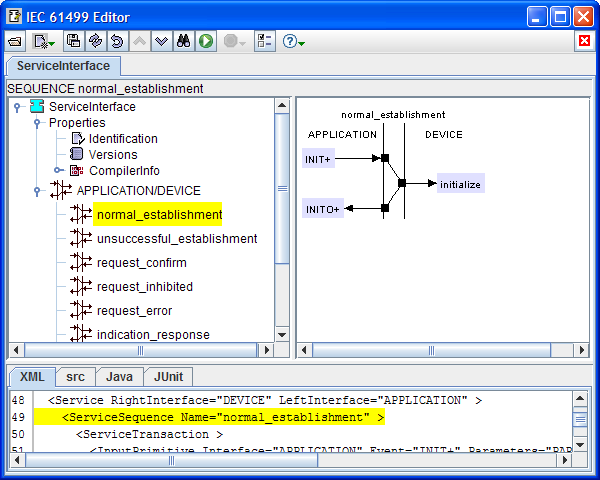
A FB type (typically but not always a service
interface function block (SIFB) type) or an adapter
type may have a service specification, which may consist of a
number of service transactions. Each service transaction consists
of zero or one input primitive represented by an arrow coming
into one of the two interfaces of the service, followed by zero or more
output primitives.
If a service specification does not already exist, you can add
one with the New Service item of the root (top) node of the Navigation
tree.
You can delete the service specification with the Delete
item of the service's popup menu in the navigation tree.
You can change the name of the left or right service interface
from the Edit item of the service's popup menu in the navigation
tree. The figure below shows the result of replacing RESOURCE
with DEVICE in the SIFB template.
You can add a sequence to the service with the New
item of the service's popup menu in the navigation tree. This opens a dialog that lets you edit the new
sequence's name and comment.You can reopen
this dialog whenever the sequence is displayed in the Worksheet
by double-clicking on the sequence name or using the Edit item
of its popup menu.
You can remove a sequence when it is displayed in the Worksheet
by using the Alt+Del keychord on its name or the Delete
item of its popup menu.
You can move a sequence up or down by selecting it in
the navigation tree, then using the Move Up/Down buttons in the menu bar.
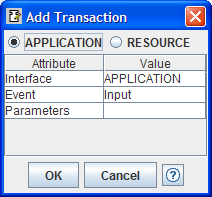
You can add a transaction to a sequence from the New
menu item of the sequence's name when it is displayed in the Worksheet.
This pops up a dialog as shown below that lets you edit the interface,
name and parameters of the transaction's initial input primitive.
You can move a transaction up or down in a sequence by
selecting its input primitive, then using the Move Up/Down buttons in the menu bar.Even if a transaction doesn't have an
actual input primitive, you can use a "dummy" input primitive for this
purpose and delete it when you're done editing the sequence.
You can remove a transaction from a sequence by
deleting all its primitives (see below).
You can add a primitive to a transaction by using the New
item of the popup menu of any primitive in the transaction.
You can move an output primitive up or down in a
transaction with the Move Up/Down
buttons in the menu bar. An
input primitive if present is always the first one in a
transaction, so it can't be moved up or down within the transaction.
That's why you can use it as a "handle" to move the whole transaction
up or down in the sequence.
You can edit a primitive by double-clicking on its name
or using the Edit item of its popup menu.
You can delete a primitive from its popup menu or by
using the Alt+Del keychord.