Adding an Algorithm to a Basic Function Block Type
| You can add an algorithm to a basic FB type with the New item of the popup menu of the Algorithms node in the Navigation tree. |
Deleting an Algorithm
You can delete an
algorithm by:
|
Editing with the Algorithm Dialog
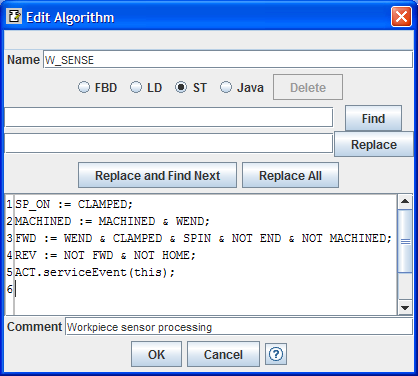
You can use this
dialog both for adding a new algorithm to a basic FB type or for
editing an existing algorithm. You invoke it by double-clicking an
existing algorithm in the Navigation tree or clicking the Edit
item of its popup menu, or by selecting the New Algorithm item
of the Algorithms popup menu in the Navigation tree. The dialog
contains:
|
 |
If you use the radio buttons to change languages,
you will see different results depending on the original and new
language selections:
You can save the changes to the
algorithm by pressing the "OK" button, and if no errors are detected,
the requested changes (if any) will be made and the dialog will close.
If you changed the name of an existing algorithm, references to the
algorithm in EC actions will be automatically updated to the new name.
If an error is detected when you
press the "OK" button, the dialog does not close, the system "beeps"
and an error message appears at the top line of the dialog in the same
manner as for EC states.
You can close the dialog without
making any changes to the algorithm by pressing the "Cancel" button or
the
 in the upper right
corner of the dialog. in the upper right
corner of the dialog. |
|
Editing ST Algorithms
| The figure above illustrates an algorithm written in the IEC
61131-3 Structured Text (ST) language. You do not need to enter the
block delimiters ALGORITHM STOP IN
ST...END_ALGORITHM.
The FBDK performs a token-wise
conversion of ST algorithms to Java using regular expressions with minimal parsing of the
ST source text. As a result, only a subset of the IEC
61131-3 ST syntax is supported. Limitations include:
|
Editing Java® Algorithms
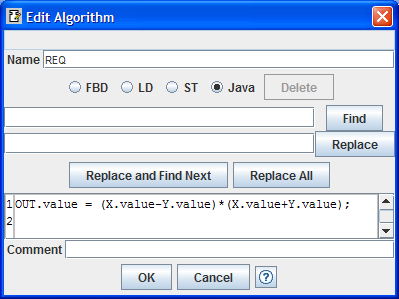
You can write
algorithms in the Java programming language as shown at right.
 To avoid namespace conflicts,
don't use words in Java literals (double-quoted strings) that
are the same as names of variables, events, etc. For instance, if you
have an input variable named To avoid namespace conflicts,
don't use words in Java literals (double-quoted strings) that
are the same as names of variables, events, etc. For instance, if you
have an input variable named QI, don't have a statement
in your Java program such asOUT.value =
"QI"+"1";However, it would be OK to say
OUT.value = "QI1";because here
QI is only part of the full word
QI1. |
 |
©2011 Holobloc Inc.
Licensed under the Academic Free License version 3.0.
Java is a registered trademarks of Oracle Corporation.